
BG-01 · Nester · v0.20.0
Stop nesting by hand. Stop wasting material.
Nester packs your real shapes, the actual outline rather than the bounding box, across as many sheets as it needs, up to 64, and the Effort control sets how hard it works at the layout. Letters, logos, cut parts, inside Illustrator.
Free to download. One activation code unlocks it for good.
 Adobe Illustrator
 Windows
macOS and CorelDRAW · on the roadmap
Requirements: Adobe Illustrator 2024 onwards, on Windows.
Four ways to nest. One plugin.
True-Shape Nest
Packs the real outline of every part, rotating and interlocking them so the gaps between letters and shapes get filled, not the empty rectangle around them. The space inside an O, between the arms of a K, under the overhang of a T: a bounding box throws it away, and Nester packs into it.
Nest Inside Shapes
Drop parts inside the holes and openings of other parts: letters inside a counter, small cuts inside a frame, a job inside an offcut. Mark the container, drop the parts in, and Nester fills it smallest-first. Nothing wasted, including the holes.
Strip & Grain
Lock parts to the material grain or the roll direction, keep a fixed strip height, and Nester respects it while it packs. For vinyl, laminates and anything where the direction matters as much as the fit.
Grid Nest
For identical rectangular parts such as labels, stickers and panels: a clean, tight grid in rows and columns, far faster than true-shape nesting. Columns and Stagger give you tidy rows or a brick layout.
Built for the shop floor, not just the design desk.
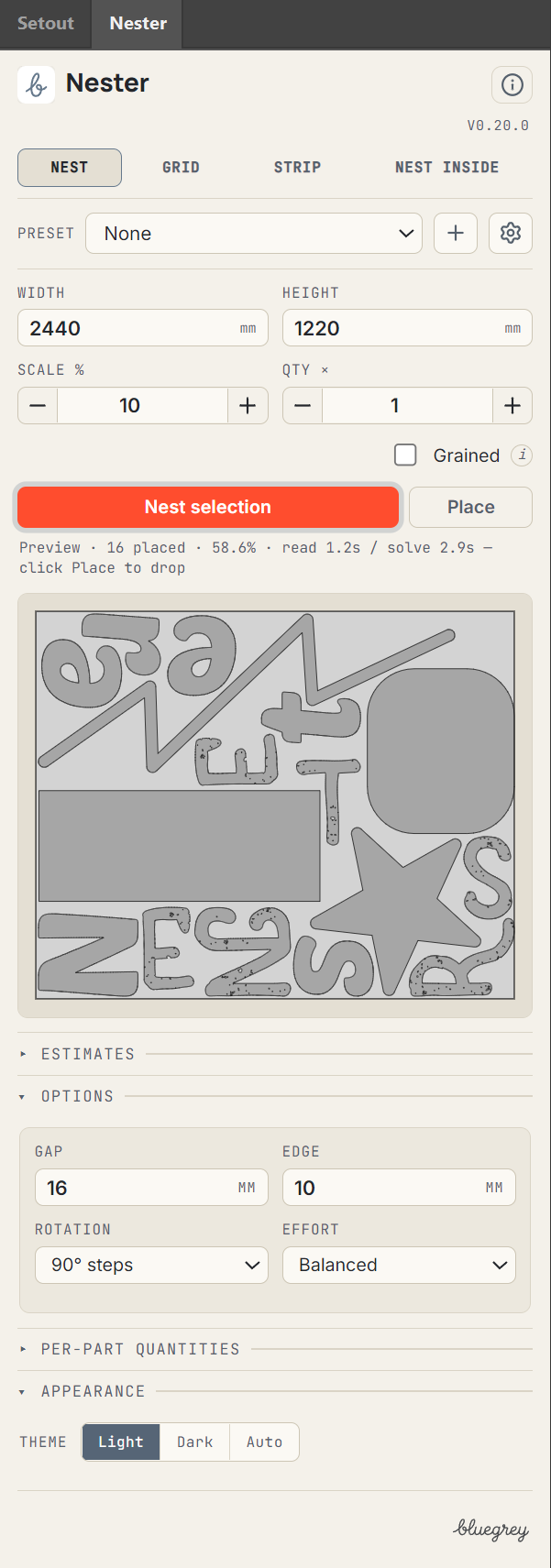
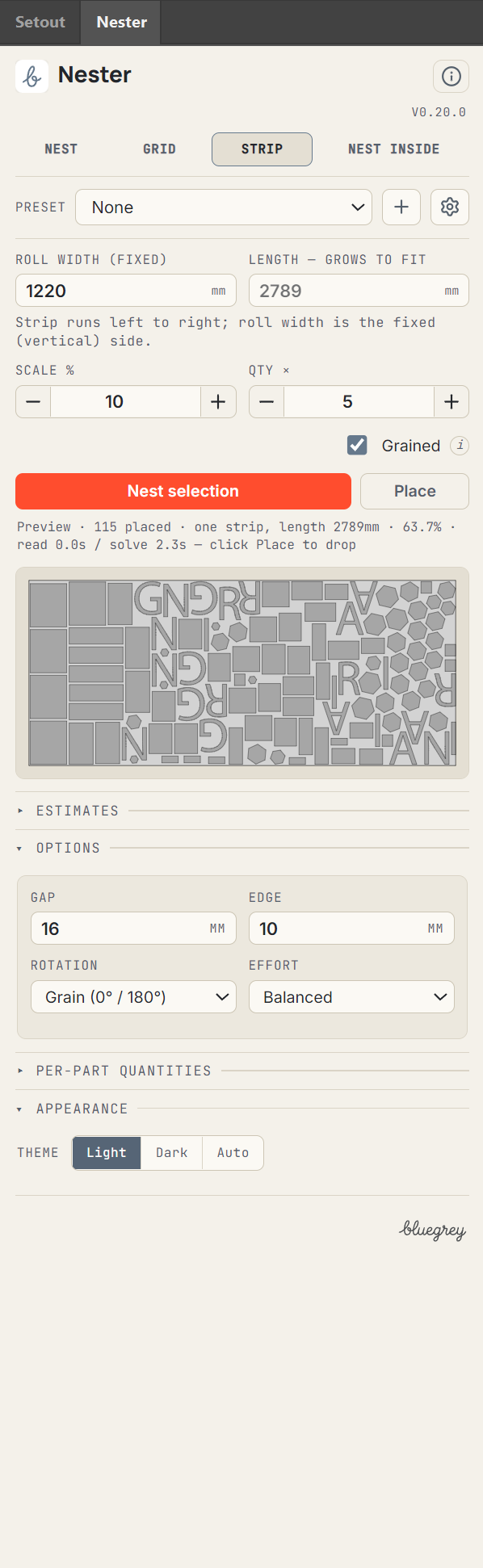
No manual required.
Set your sheet size, pick a mode, hit Nest. Width, height, scale, quantities, grain and gap sit on one panel, where you would expect them. Save your common setups as presets and reuse them in one click.
If you cut it, lay it out or print it, Nester's for you.
The job it replaces: nesting by hand in Illustrator, dragging parts round a sheet, eyeballing the gaps, and cutting more material than the job needed.
Vinyl & wide-format
Squeeze every letter and graphic onto the roll. Less waste per metre, more jobs per sheet.
CNC & routing
Nest real part outlines for the router bed and cut the offcuts down too.
Laser cutting
True-shape packing for acrylic, ply and metal. Fit more per sheet, every sheet.
Channel letters & built-up signs
Nest faces, returns and backs together; keep the set on one sheet where it fits.
Vehicle wraps & graphics
Lay panels and elements out tight before you commit the print.
Sticker & decal makers
Pack a full sheet of mixed shapes, kiss-cut ready.
Print & prepress
Gang up jobs, fill the sheet, hand prepress a tight layout.
Apparel, POD & merch
Nest transfers and prints to get the most off every sheet of film.
Engravers & makers
Anything you cut from sheet stock packs tighter with true-shape nesting.
Select, set the sheet, nest, place.
Select your parts
The vector shapes you want to cut, in Illustrator. Live text is outlined first: Type, then Create Outlines.
Set your sheet size
Width and height in millimetres: the material you are cutting from. Pick the mode that matches the job.
Click Nest selection
A preview of the packed sheet appears in the panel, with the sheet count and how long it took. More than one sheet? It spills onto as many as it takes.
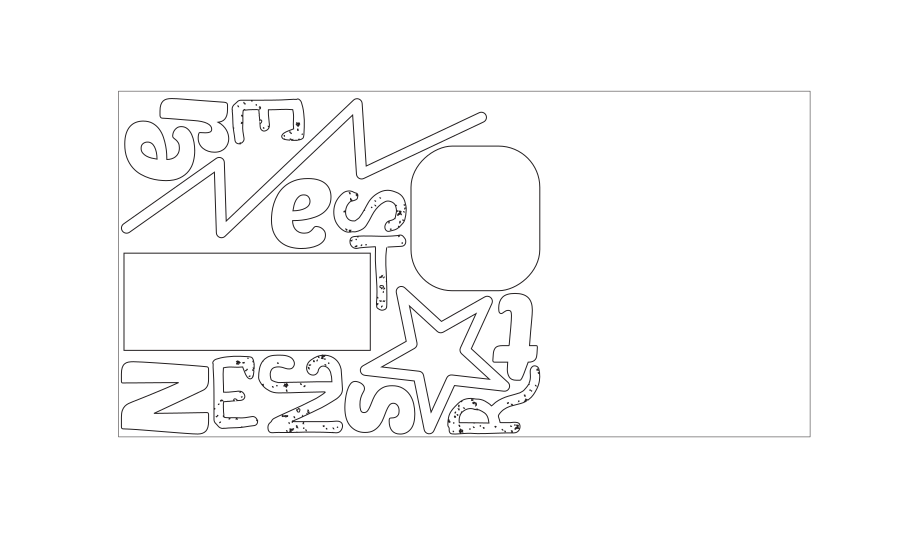
Click Place
The nest drops into your document, grouped, on its own layer, ready to move or cut. Locked, this is the one button that waits for the activation code.
What it needs, and what it takes.
Adobe Illustrator
Windows
macOS
Roadmap
CorelDRAW
Roadmap
- Illustrator
- Requirements: Adobe Illustrator 2024 onwards, on Windows.
- Platform
- Windows. macOS and CorelDRAW are on the roadmap and do not run it today.
- Artwork and files
- Any vector artwork open in Illustrator: paths, compound paths and groups, in any file Illustrator opens. Live text is outlined first (Type, then Create Outlines). Nester works on your selection; it does not open files itself.
The licence, in plain words.
The long version is on the licence page. This is all of it that matters when you buy.
Built for our own work. Proven on real jobs.
Nester runs every week at a working manufacturer, on live production jobs. It earned its place on our own floor before it was sold to yours, and because we use it every week, it does not get abandoned.
See it work.
One subscription. Every update included.
Pay yearly and pay half.
Solo
£90
a year · 1 seat, 2 machines
£15
a month · 1 seat, 2 machines
- Sole traders and single workstations
- Every mode, the full engine
- Estimates included
- Every update included
Most shops pick this
Shop
£210
a year · 5 seats, 10 machines
£35
a month · 5 seats, 10 machines
- A working sign shop
- Every mode, the full engine
- Estimates included
- Every update included
Site
£540
a year · 20 seats, 40 machines
£90
a month · 20 seats, 40 machines
- Bigger shops, everything under one roof
- Every mode, the full engine
- Estimates included
- Every update included
| Nester tier | Solo | Shop | Site |
|---|---|---|---|
| Price Differs | £90 a year£15 a month | £210 a year£35 a month | £540 a year£90 a month |
| Seats Differs | 1 | 5 | 20 |
| Machines Differs | 2 | 10 | 40 |
| True-shape nesting: real outlines, turned and interlocked | Included | Included | Included |
| Nests parts inside holes and cut-outs | Included | Included | Included |
| Locks parts to the grain or the roll direction | Included | Included | Included |
| Grid nest for parts that are all the same rectangle | Included | Included | Included |
| The whole job, across as many sheets as it needs | Included | Included | Included |
| No overlaps. The collision engine will not allow one. | Included | Included | Included |
| Keeps compound paths, groups and cut-outs whole | Included | Included | Included |
| Effort dial: a quick check, or the best pack | Included | Included | Included |
| Material used, sheets needed and cut cost, before you cut | Included | Included | Included |
| Saved presets for your materials and your machines | Included | Included | Included |
| Free download. See a full nest before you buy. | Included | Included | Included |
| Every update included while you subscribe | Included | Included | Included |
| Monthly or yearly, stop whenever you like | Included | Included | Included |
| Works offline for 30 days at a time | Included | Included | Included |
| Answered by the people who wrote it | Included | Included | Included |
Every tier is the whole tool. The only differences are the price, the number of seats and the number of machines.
One seat covers two machines, for example a desktop and a laptop. The number of seats is how many people can be signed in at the same time.
Want Setout as well?
Both tools Setout · Sizes on the drawing, at your scale
Nester and Setout together, on one subscription.
Both tools, Shop: £270 a year£45 a month for 5 seats, 10 machines. From £120 a year£20 a month.
Every tier is the full Nester: same engine, same modes, same Estimates. The only difference is the number of seats and machines: Solo 1 seat, 2 machines; Shop 5 seats, 10 machines; Site 20 seats, 40 machines. Pay monthly or yearly, and every update is included for as long as you subscribe. Stop, and Nester drops back to the free version: it still nests and prices your artwork, it will not place it.
Requirements: Adobe Illustrator 2024 onwards, on Windows.
Read up first: Help guide · Requirements and install · Release notes.
Not sure yet? Download it free and nest your own artwork first. It's below.
Download it free. Nest your own artwork. Then decide.
One file, free, no card and no account. Nester runs straight away, locked: it nests your artwork and prices the sheet, but it will not place the result on your artboard. You see the value; you cannot keep it yet.
Buy a licence, paste the activation code into the panel, and the same panel is the full one. Place stops reading Buy.
No download here yet: the signed installer is not finished. Email hello@bluegrey.ai and we send you the current Nester build by hand.
The five things people ask before they buy.
What does the free download do before I pay?
Nester nests and prices your artwork but will not place the result on your artboard. It is the full engine and the full panel; nothing is cut down. One file, downloaded free by anyone. The activation code you buy opens it. The thing you tried is the thing you bought.
What do seats and machines mean, and how many do I get?
One seat covers two machines, for example a desktop and a laptop. The number of seats is how many people can be signed in at the same time. A machine is one computer with Illustrator on it. Your tier sets how many you can activate at once; on one more than that, the panel says so and stays as it was until an activation is released. Replace a machine and the old activation can be released. Solo: 1 seat, 2 machines; Shop: 5 seats, 10 machines; Site: 20 seats, 40 machines.
Is it a subscription?
Yes, monthly or yearly. You subscribe, monthly or yearly, for the seats and machines your tier allows. The yearly price is the one most shops pick. Every update is included for as long as you subscribe: fixes, speed-ups and new features alike. There is no v2 to pay for and no upgrade fee. Stop paying and the subscription ends at the close of the period you paid for. Nester drops back to the free version, which still nests and prices but will not place; Setout shades over until you come back. Nothing is deleted and your files are untouched.
What if it is not for me?
Do not buy it: download it free and run it on your own artwork first. Once an activation code is issued the purchase is final, unless the software is broken: if it does not do what this page says, or will not run on a setup this page says it runs on, we fix it or refund it. The refunds page says it plainly. Lemon Squeezy takes the payment as merchant of record, handles VAT and emails the activation code. Prices here are in pounds; checkout shows your own currency.
Which versions of Illustrator, and what about a Mac?
Requirements: Adobe Illustrator 2024 onwards, on Windows. macOS and CorelDRAW are on the roadmap. If it will not run on a setup this page says it runs on, that is covered by the refund above.
How support works.
Email hello@bluegrey.ai with what happened and, if you can, a screenshot and roughly what the job was. The person who wrote the thing you are asking about is the one who answers. No phone line, no chat widget, no ticket system.
Read up, if you like: Help guide · Requirements and install · Release notes.
Hear when Nester changes.
One line when a Nester release is worth knowing about. Nothing else.
You're in. We will email you at the right moment, and not before. More detail to share? Pick which tools you care about.
That didn't save. Email hello@bluegrey.ai instead and we will add you by hand.
No spam, no list-selling. A few emails a year at most, and one reply takes you off.
Pairs well with
Nester, in plain words
Nester is a true-shape nesting plugin for Adobe Illustrator, with CorelDRAW on the roadmap, for sign making, vinyl and wide-format print, CNC routing and laser cutting. It packs real shapes across sheets, fills offcuts, respects grain and shows the cost before you cut.