
BG-05 · Setout
Sizes on the drawing, at the real size.
Sign artwork is drawn small and made big. Select something, pick the sides, press the button, and the dimensions land on your artwork at your working scale. Contour length for neon and LED, priced. Transform, Align and Pathfinder in the same column.
Free to download, in full, for the trial. One activation code keeps it.
 Adobe Illustrator
 Windows
macOS · on the roadmap
Requirements: Adobe Illustrator 2026, on Windows. It may run on 2024 and 2025, but we have not tested them and do not claim them.
Measure, price, and keep three windows shut.
Dimensions at your scale
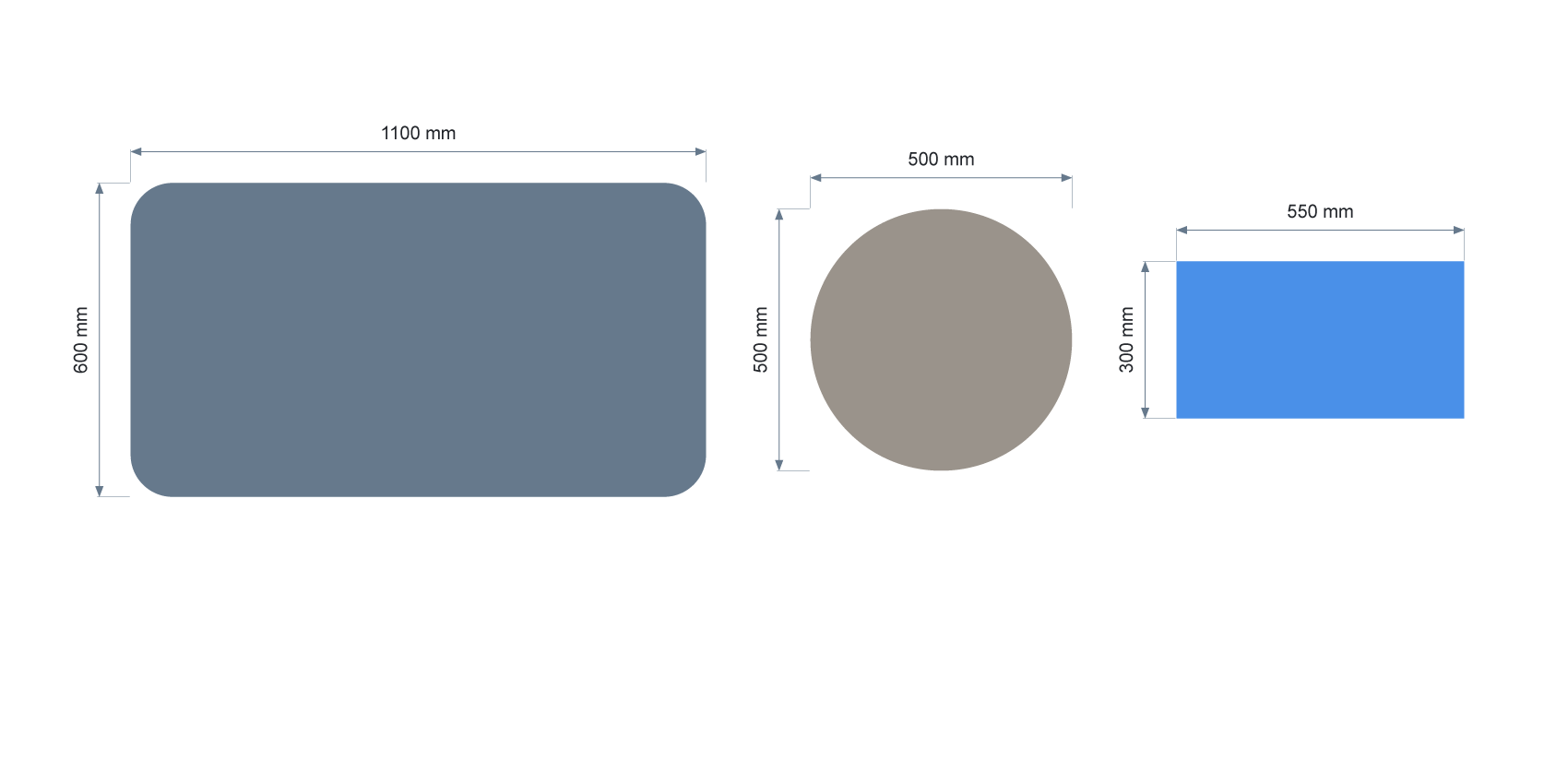
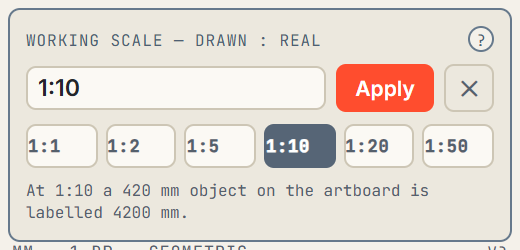
Pick the sides you want a size on and press Add dims. At 1:10 a 100 mm object is labelled 1000 mm: the label reports the real sign and the artwork is never touched. Drawn to the same anatomy as Illustrator's own Dimension tool, on their own Dimensions layer.
Contour length, priced
The length round the outside of a selection, grouped or compound, as one number. Put a rate per metre in the settings and the cost sits under the length: the figure a neon or LED quote is built on.
Transform, Align and Pathfinder
Illustrator's own three, in the same column, working in document units exactly as their own panels do. Three floating windows can stay closed.
Live text, measured as letters
Select live text, press Add dims, and you get the size of the letters rather than the box around them. Your text stays live and editable.
Built for the drawing that has to be right at the real size.
If a drawing has to be approved, priced or made at the real size, Setout is for you.
The job it replaces: measuring with the ruler, typing each size into a text box, working the scale out in your head, and doing it all again when the artwork changes.
Sign drawings for approval
Every size on the drawing says the real size, so the customer signs off the sign, not the page.
Neon and LED quotes
Contour length, priced off your rate per metre, before the quote goes out.
Fabrication drawings
Dimensions for the bench and the CNC, on their own layer, rebuilt with one press when the artwork changes.
Select, pick the sides, press the button.

Select your artwork
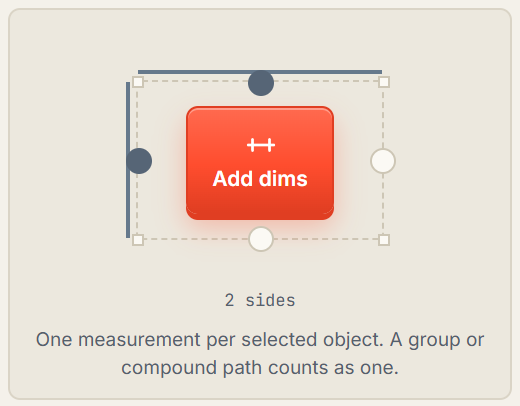
Anything on the artboard: a shape, a group, a letter. One measurement per selected object.
Pick the sides
Press the small circles on the box in the middle of the panel: top, bottom, left, right. Hover one and it names itself.
Check the scale
The top bar shows the scale you are drawing at, 1:10 by default. Tap it to change. The label reports the real sign; the artwork is not touched.
Press Add dims
The sizes land on the drawing, on their own Dimensions layer. Resize something later and Re-measure rebuilds every label.
What it needs, and what it takes.
Adobe Illustrator
Windows
macOS
Roadmap
- Illustrator
- Requirements: Adobe Illustrator 2026, on Windows. It may run on 2024 and 2025, but we have not tested them and do not claim them.
- Platform
- Windows. macOS are on the roadmap and do not run it today.
- Artwork and files
- Any Illustrator artwork, in any file Illustrator opens: paths, groups and compound paths, one measurement per object, and live text measured as letters.
The licence, in plain words.
The long version is on the licence page. This is all of it that matters when you buy.
Built for sign drawings. Used on them every day.
Setout is in daily use at a working manufacturer, on live sign drawings. The point-to-point Tape Measure is parked while its gesture is settled; the button is in the panel and says so rather than pretending otherwise.
One subscription. Every update included.
Pay yearly and pay half.
Solo
£60
a year · 1 seat, 2 machines
£10
a month · 1 seat, 2 machines
- Sole traders and single workstations
- Every control, the whole panel
- Profiles, export and import
- Every update included
Most shops pick this
Shop
£150
a year · 5 seats, 10 machines
£25
a month · 5 seats, 10 machines
- A working sign shop
- Every control, the whole panel
- Profiles, export and import
- Every update included
Site
£360
a year · 20 seats, 40 machines
£60
a month · 20 seats, 40 machines
- Bigger shops, everything under one roof
- Every control, the whole panel
- Profiles, export and import
- Every update included
| Setout tier | Solo | Shop | Site |
|---|---|---|---|
| Price Differs | £60 a year£10 a month | £150 a year£25 a month | £360 a year£60 a month |
| Seats Differs | 1 | 5 | 20 |
| Machines Differs | 2 | 10 | 40 |
| Dimensions added with one button press. No dragging. | Included | Included | Included |
| Dimensions written at your working scale | Included | Included | Included |
| Contour length measured with one button press | Included | Included | Included |
| Contour length priced from your rate per metre | Included | Included | Included |
| Live text measured as letters, not as the box round them | Included | Included | Included |
| Transform, Align and Pathfinder in the same panel | Included | Included | Included |
| Seven more measurements, one switch away | Included | Included | Included |
| Draughtsman line work, on its own layer | Included | Included | Included |
| Profiles you can export and share with the team | Included | Included | Included |
| Tells you the problem. It does not write a wrong number. | Included | Included | Included |
| Re-measure makes every label again after a change | Included | Included | Included |
| Free trial: the whole tool, 7 days | Included | Included | Included |
| Every update included while you subscribe | Included | Included | Included |
| Monthly or yearly, stop whenever you like | Included | Included | Included |
| Answered by the people who wrote it | Included | Included | Included |
Every tier is the whole tool. The only differences are the price, the number of seats and the number of machines.
One seat covers two machines, for example a desktop and a laptop. The number of seats is how many people can be signed in at the same time.
Want Nester as well?
Both tools Nester · Tight nests, less waste
Nester and Setout together, on one subscription.
Both tools, Shop: £270 a year£45 a month for 5 seats, 10 machines. From £120 a year£20 a month.
Every tier is the full Setout: same panel, same measurements, same profiles. The only difference is the number of seats and machines: Solo 1 seat, 2 machines; Shop 5 seats, 10 machines; Site 20 seats, 40 machines. Pay monthly or yearly, and every update is included for as long as you subscribe. Stop, and Setout shades over until you come back.
Requirements: Adobe Illustrator 2026, on Windows. It may run on 2024 and 2025, but we have not tested them and do not claim them.
Read up first: Help guide · Requirements and install.
Not sure yet? Download it free and use it in full for the trial. It's below.
Download it free. Use it in full. Then decide.
One file, free, no card and no account. Setout runs in full for 7 days: every control, every measurement, on your own drawings. When Illustrator opens, the panel says how many days are left and carries a Buy now button.
Buy a licence, paste the activation code into the panel, and the clock stops.
No download here yet: the signed installer is not finished. Email hello@bluegrey.ai and we send you the current Setout build by hand.
The five things people ask before they buy.
What does the free download do before I pay?
Setout runs in full for 7 days from install; when Illustrator opens, the panel says how many days are left and carries a Buy now button. It is the full engine and the full panel; nothing is cut down. One file, downloaded free by anyone. The activation code you buy opens it. The thing you tried is the thing you bought.
What do seats and machines mean, and how many do I get?
One seat covers two machines, for example a desktop and a laptop. The number of seats is how many people can be signed in at the same time. A machine is one computer with Illustrator on it. Your tier sets how many you can activate at once; on one more than that, the panel says so and stays as it was until an activation is released. Replace a machine and the old activation can be released. Solo: 1 seat, 2 machines; Shop: 5 seats, 10 machines; Site: 20 seats, 40 machines.
Is it a subscription?
Yes, monthly or yearly. You subscribe, monthly or yearly, for the seats and machines your tier allows. The yearly price is the one most shops pick. Every update is included for as long as you subscribe: fixes, speed-ups and new features alike. There is no v2 to pay for and no upgrade fee. Stop paying and the subscription ends at the close of the period you paid for. Nester drops back to the free version, which still nests and prices but will not place; Setout shades over until you come back. Nothing is deleted and your files are untouched.
What if it is not for me?
Do not buy it: download it free and run it on your own artwork first. Once an activation code is issued the purchase is final, unless the software is broken: if it does not do what this page says, or will not run on a setup this page says it runs on, we fix it or refund it. The refunds page says it plainly. Lemon Squeezy takes the payment as merchant of record, handles VAT and emails the activation code. Prices here are in pounds; checkout shows your own currency.
Which versions of Illustrator, and what about a Mac?
Requirements: Adobe Illustrator 2026, on Windows. It may run on 2024 and 2025, but we have not tested them and do not claim them. macOS are on the roadmap. If it will not run on a setup this page says it runs on, that is covered by the refund above.
How support works.
Email hello@bluegrey.ai with what happened and, if you can, a screenshot and roughly what the job was. The person who wrote the thing you are asking about is the one who answers. No phone line, no chat widget, no ticket system.
Read up, if you like: Help guide · Requirements and install.
Hear when Setout changes.
One line when a Setout release is worth knowing about. Nothing else.
You're in. We will email you at the right moment, and not before. More detail to share? Pick which tools you care about.
That didn't save. Email hello@bluegrey.ai instead and we will add you by hand.
No spam, no list-selling. A few emails a year at most, and one reply takes you off.
Pairs well with
Setout, in plain words
Setout is a dimensioning and measuring panel for Adobe Illustrator, built for sign makers. It writes dimensions onto artwork at the working scale, measures contour length for neon and LED, and keeps Transform, Align and Pathfinder in one column.